5 min read
From prompt to preview: how an AI agent updates a website

The first wave of generative AI tools helped people create text, images and code snippets. An AI agent goes a step further: it can understand a goal, inspect the project context, use connected tools, complete a multi-stage task and hand the result to a person for approval.
Website management illustrates this difference well. Instead of moving manually between an editor, repository, tests and deployment platform, a user describes the expected outcome in natural language. The agent carries out the process within its granted permissions and established rules.
This is also how the agent supporting content management for this website works.
An agent is more than a text generator
A language model can draft an article. An agent has a broader role: it combines a model with instructions, organisational knowledge and the tools required to complete a task.
In practice, it can:
- inspect the existing website structure and locate the right files;
- compare new content with the language used across service pages and previous publications;
- prepare copy, metadata, internal links and visual assets;
- check syntax, asset references and whether the website can still be built;
- record the change in a repository and open a pull request;
- find the preview URL and provide it for review.
This is an example of an AI agent specialised in a specific process. It is not given unlimited autonomy. It operates within a defined scope, uses only the systems made available to it and leaves higher-impact operations to a human decision.
From a request to a ready change
A user might write:
Add an article about automating content work. Align it with our AI Agents page, prepare the visuals and show me the finished page before publication.
That short request starts a complete workflow. The agent first identifies the goal and constraints. It then treats the repository as the source of truth, checking the project structure, existing post format, terminology, categories, asset conventions and publication rules.
Only then does it prepare the change. For a blog post, this includes more than the body copy: the title and SEO description, date, tags, image alt text, links to related material and compatibility with the Astro components.
The diagram below shows the complete workflow. The final stage matters most: the agent brings the change to a review-ready state, but it does not independently decide to publish it.
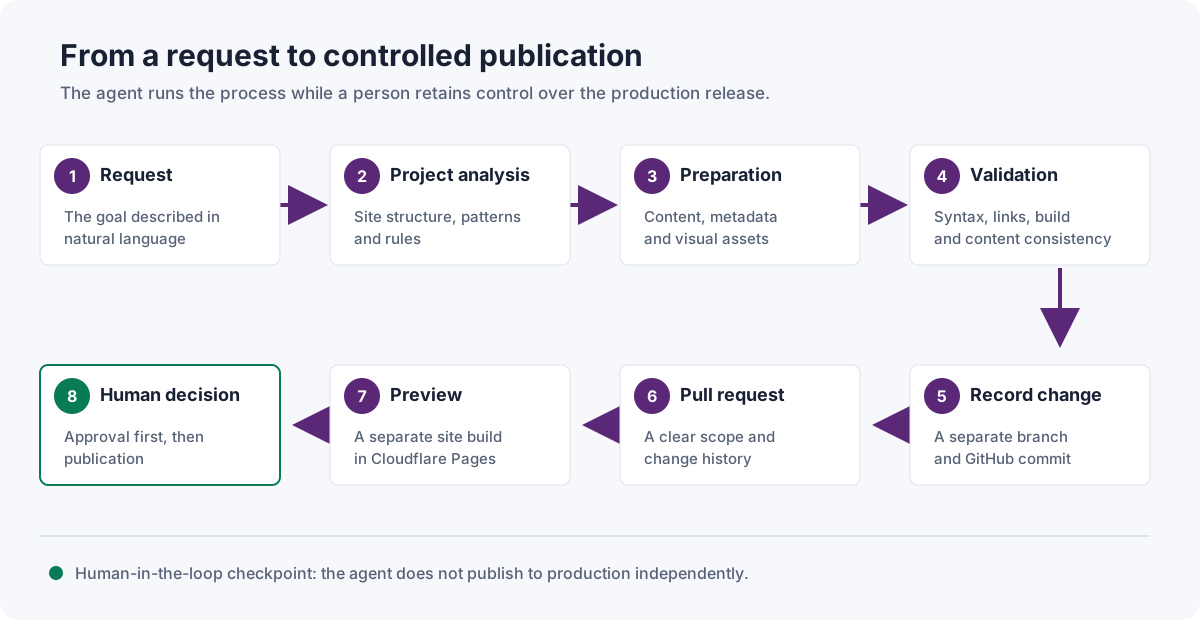
A content update workflow with human control before publication.
The repository provides context and history
The website’s code and content are stored in GitHub. The agent therefore works with the same current materials as the team and follows the conventions recorded in the project. It does not have to guess what a post should look like, where images belong or which metadata fields are required.
It creates a separate branch for each task, so the proposed change does not directly affect the production version. When the work is complete, the agent records it in a commit and opens a pull request where the team can:
- see every changed file;
- compare the new version with the current one;
- review the checks that were performed;
- discuss revisions while preserving their history;
- approve or reject the proposal.
The repository serves two purposes. It gives the agent the context needed to work consistently, while providing the team with an auditable record of its actions.
Quality control is part of the task
Creating a file does not mean the change is ready. The agent validates the result in proportion to its risk: it checks Astro and MDX syntax, required metadata, image references, internal links and the outcome of the project’s available tests.
The review also covers the content itself. The agent should not add unverified product capabilities, results, references or figures. It should preserve the website’s terminology, separate facts from assumptions and flag changes concerning pricing, legal terms, privacy or other sensitive commitments.
These rules are part of the agent’s design, just like access to tools or the language model. They turn a general AI capability into a predictable business process.
Cloudflare Pages provides an isolated preview
After a pull request is opened, Cloudflare Pages can build a separate version of the website for that branch. The change is still not public on the production site, but the person responsible for the content can open a unique URL and review the article together with its layout, images, navigation and mobile behaviour.
If a revision is needed, the user provides another instruction. The agent updates the same branch, repeats its checks and the preview is rebuilt.
Only after the content has been reviewed and explicit confirmation has been given can the pull request be merged into the main branch. In this project, that merge publishes the change to the production website. The boundary of responsibility is clear: the agent prepares and documents the change, while a person decides whether to release it.
What this example tells us about AI agents
The important change is not content generation by itself. It is the ability to handle a complete process through conversation without giving up the control mechanisms already used by the organisation.
The same pattern can support documentation updates, report preparation, product catalogue management, ticket handling or information retrieval from company databases. Each use case needs four elements:
- a clearly defined goal and scope;
- access to the right data and systems;
- controls matched to the risk of the process;
- checkpoints where the decision remains with a person.
At Inero Software, we design agents around specific processes, tools and organisational requirements. A website content agent is a straightforward but complete example: it understands an instruction, works across several systems, validates the result and leaves control over publication with a person.
- AI Agents
- AI Agent
- process automation
- Astro
- Cloudflare Pages
- GitHub
- human-in-the-loop
- Artificial Intelligence